
Voiply Business Starter
Starter accounts are not able to port a number during sign-up. You will select a new number when placing your order, and you can submit a port request later through your account portal once your service is active.
To get started, see: How to Submit a Port Request Through the Portal
Voiply Business Premier
During Sign-Up
Premier accounts have the option to begin the porting process right at checkout.
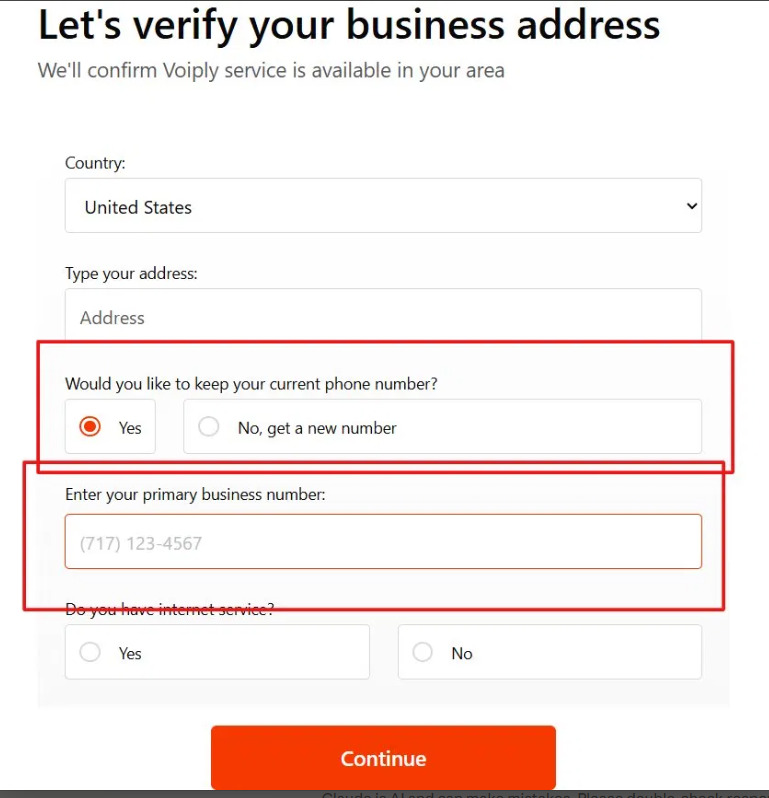
- When placing your order at voiply.com/business-phone-solutions, you will be asked if you would like to keep your current phone number.
- Select Yes, then enter your primary business number in the field provided.
- Complete the remaining steps to finish your order. Your port request will be submitted automatically once the order is placed.
- The process typically takes 5–10 business days depending on your current provider. You will receive email updates on the status of your request.
- Once your number is successfully transferred, you will be notified to complete activation with Voiply Business.
After Sign-Up
Premier customers can also port a number at any time through the account portal. See: How to Submit a Port Request Through the Portal
Tip: Keep your existing phone service active until porting is fully complete to avoid any interruption to your service.