
How to Book a Callback
Skip the wait on hold. Learn how to book, move or cancel a support callback from your Voiply portal, or ask our phone, text or chat assistant to book one for you.
Skip the wait on hold. Pick a time that works for you, and a Voiply agent will call you. This guide shows you how to book, move or cancel a callback.
Book a callback from your portal
Booking a callback works the same on every Voiply plan.
- Log in to your Voiply portal at voiply.com/portal (opens in a new tab).
- On your dashboard, find the Book a support callback card.
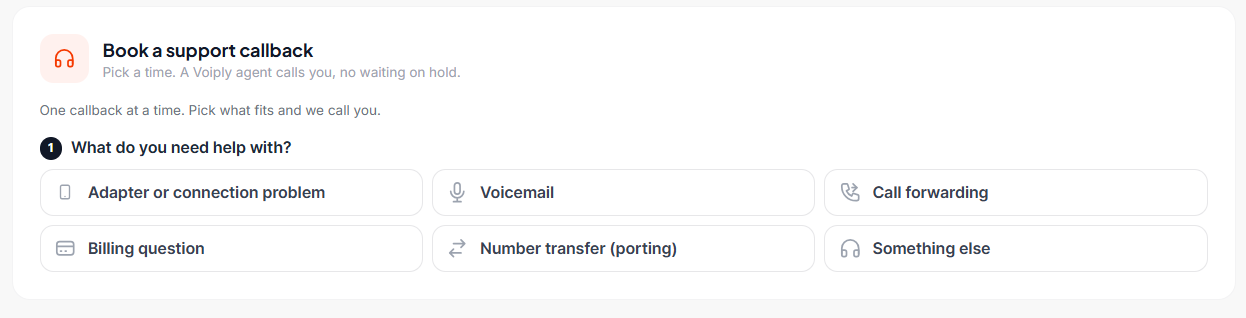
- Under What do you need help with?, choose the topic that fits best:
- Adapter or connection problem
- Voicemail
- Call forwarding
- Billing question
- Number transfer (porting)
- Something else
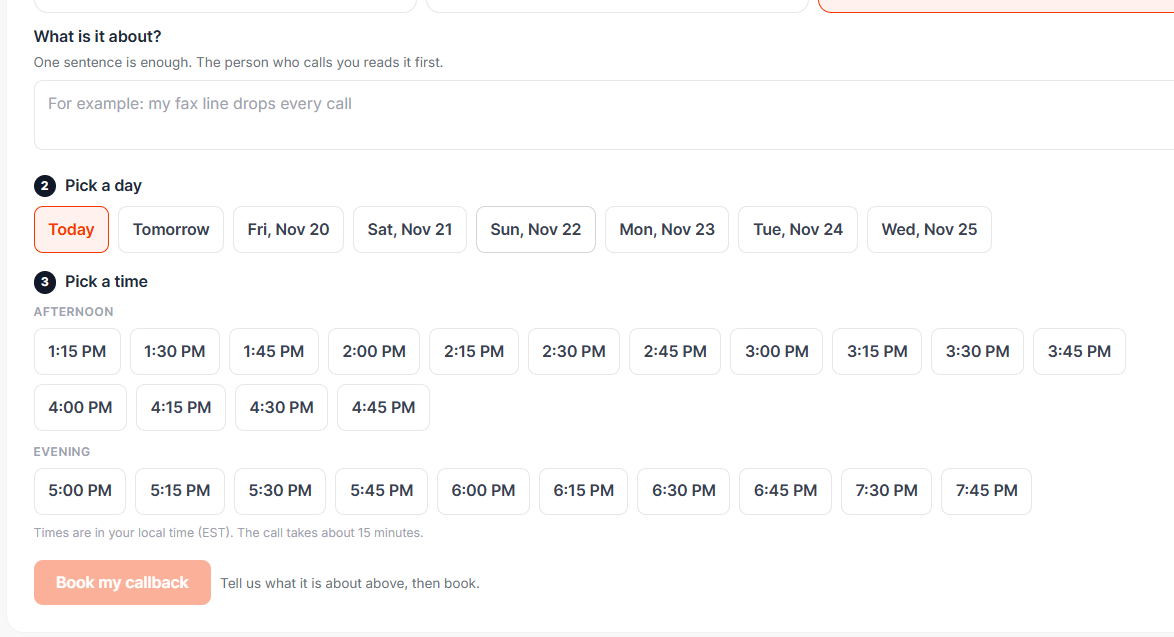
- Under What is it about?, write one short sentence about the problem, for example “My fax line drops every call.” The person who calls you reads this first.
- Pick a day, then pick a time. Times are shown in your local time.
- Check the email where we should send your confirmation.
- Click Book my callback.
You’ll see a confirmation on your dashboard, and we’ll send you a confirmation email and text. You can also add the callback to your Google, Apple or Outlook calendar.
Book a callback by phone, text or chat
You can also ask any of our assistants to book a callback for you:
- Call (844) 843-4175
- Text (844) 843-4174
- Chat with us in your Voiply portal
Tell the assistant what you need help with and when you’re free, and it will book a time for you.
Move or cancel your callback
Your booked callback shows on your dashboard.
- To pick a new time, click Move callback, choose a new day and time, then click Move my callback.
- To cancel, click Cancel callback, then Yes, cancel it. This frees up the time for someone else.
What to expect
- We’ll send you a text reminder 15 minutes before your call.
- Your call will come from (844) 843-4174. Your phone may show “Voiply Support.”
- Please keep your phone close and pick up. If we miss each other for any reason, we’ll text you a link to book a new time.
Good to know
- You can have one callback booked at a time. If you need to change it, move it rather than booking a new one.
- If you’ve had a recent callback, the portal may show the earliest time you can book your next one. If your service is down and it can’t wait, call us at (844) 843-4175.
- If no times show, try again later or call us at (844) 843-4175.
Still need help? Call us at (844) 843-4175 or email [email protected].
Did this answer your question?
Glad it helped.
Try one of these next: