
E911 tells emergency responders where to go when someone calls 911 from your phone. Setting it up correctly is one of the most important steps for your child's safety, so it is worth taking a minute to enter your address and double-check that it is right.
This guide shows you how to turn on emergency location services, enter your home address, save it, and confirm it was saved.
How to Log In to Your Voiply Portal
- Go to voiply.com and click Login.
- Enter your 10-digit Voiply phone number, then click Continue.
- Check the masked email shown on the screen. Voiply will send a secure Magic Link to that email address.
- Open the email from Voiply with the subject Use this link to sign in, then click the Sign in link button. You will be logged in automatically.
For more details, see How to Log In to Your Voiply Portal.
How to Open the E911 Settings
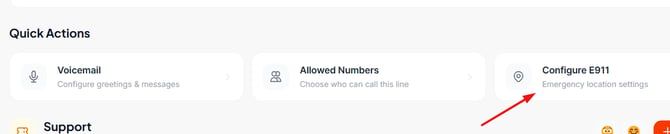
- Once you are logged in, scroll down to the Quick Actions section.
- Click the Configure E911 tile (Emergency location settings) to open the Registered E911 Location screen.
Turn On Emergency Location Services
Make sure the E911 Active toggle is turned on. This shares your registered address with emergency services, so responders know where to go if someone calls 911 from this phone. 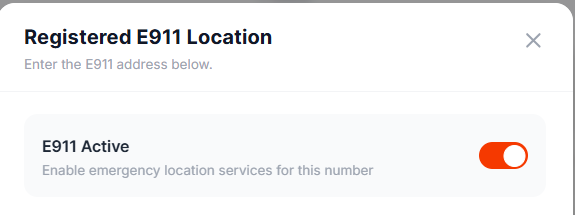
Enter Your Home Address
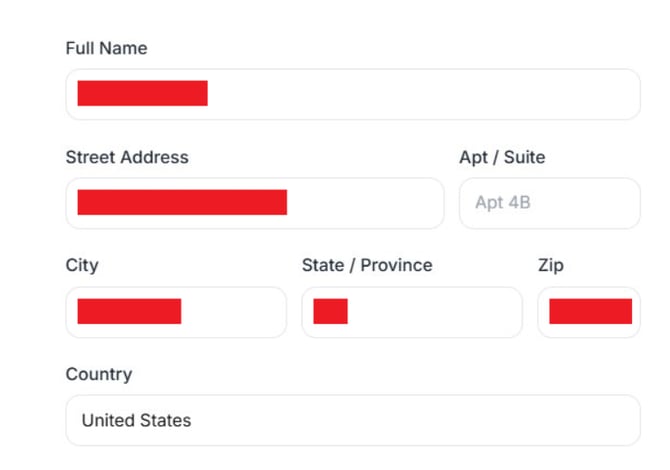
Fill in the address fields with the home where this phone is located. Make sure every field is correct and complete.
- Full Name — The name to register for this location.
- Street Address — Your home street address.
- Apt / Suite — Add this only if you have one. You can leave it blank if you do not.
- City — Your city.
- State / Province — Your state.
- Zip — Your full ZIP code.
- Country — Your country.
Save and Confirm 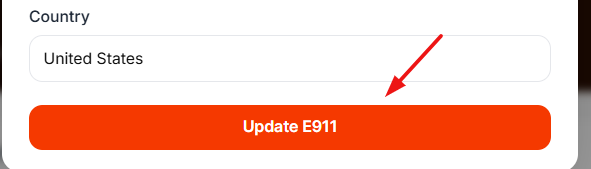
- When the address is complete, click Update E911. Your address takes effect right away.
- To make sure it saved, close the screen and open Configure E911 again. Your saved address will be shown in the form.
A Few Things to Remember
- The address you register is the location shared with 911, so keep it accurate and complete.
- If you move, update this address right away so emergency responders always have the correct location.
- Keep the E911 Active toggle turned on.
Need Help?
If you have questions or need a hand, Voiply Support is here for you.
📞 Support: 1-844-486-4759 ✉️ support@voiply.com
For all the ways to reach us, see Contact Voiply Support. To submit and track a help request right from your portal, see How to Create and Manage Support Tickets in Your Voiply Portal.