
The Kids Phone Plan lets you choose exactly who can call the line. Only the numbers on the allowed list can ring through. Anyone not on the list hears a message that the user is unavailable.
This guide shows you how to open the allowed list, add a number, search your numbers, and remove a number.
Good to know before you start: If the allowed list is empty, no one can call the line. Be sure to add at least one trusted number, like your own, so your child can always reach you.
How to Log In to Your Voiply Portal
- Go to voiply.com and click Login.
- Enter your 10-digit Voiply phone number, then click Continue.
- Check the masked email shown on the screen. Voiply will send a secure Magic Link to that email address.
- Open the email from Voiply with the subject Use this link to sign in, then click the Sign in link button. You will be logged in automatically.
For more details, see How to Log In to Your Voiply Portal.
How to Open the Allowed Callers List
- Once you are logged in, scroll down to the Quick Actions section.
- Click the Allowed Numbers tile (Choose who can call this line) to open the Allowed Callers list.
The Allowed Callers window will open.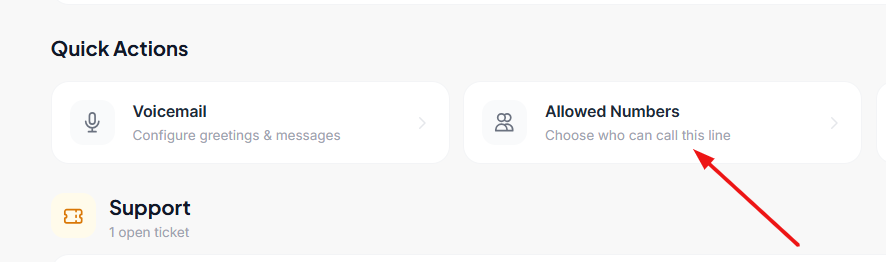
How to Add an Allowed Number
- In the Add Allowed Number box, type the 10-digit phone number you want to allow. Enter numbers only, with no spaces, dashes, or parentheses. (Example: 2125551234)
- Click Allow.
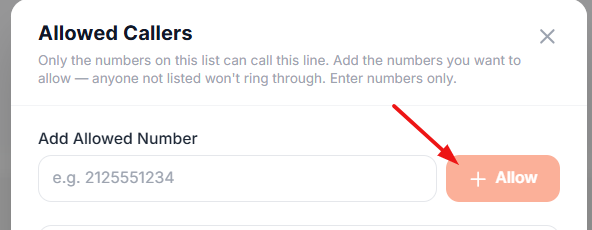
The number now shows in your allowed list and can call the line. Repeat these steps for each number you want to add.
How to Search Your Allowed Numbers
If you have several numbers saved, you can find one quickly.
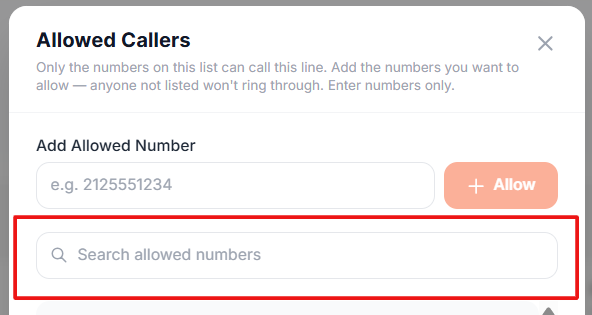
- Click the Search allowed numbers box.
- Start typing the number you are looking for.
- The list updates to show only the numbers that match.
How to Remove an Allowed Number
- Find the number you want to remove. You can use the search box to find it faster.
- Click the trash can icon to the right of that number.
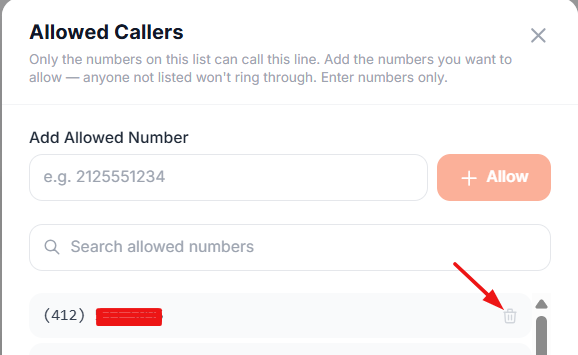
The number is removed right away and can no longer call the line.
A Few Things to Remember
- Only the numbers on your allowed list can call the line. Everyone else hears a message that the user is unavailable.
- If the list is empty, no one can call the line. Always keep at least one trusted number on the list.
- The note at the bottom of the window shows how many numbers are currently allowed.
Need Help?
If you have questions or need a hand, Voiply Support is here for you.
📞 Support: 1-844-486-4759 ✉️ support@voiply.com
For all the ways to reach us, see Contact Voiply Support. To submit and track a help request right from your portal, see How to Create and Manage Support Tickets in Your Voiply Portal.