
Before You Start
You'll need access to your Voiply Account Portal. The portal uses a Magic Link sent to your registered email address to log you in — no password needed.
If you haven't logged in before or need help getting in, check out our step-by-step guide here: How to Log In to Your Voiply Portal
How to Submit a Cancellation Request
Step 1: Scroll to the Bottom of the Page
At the bottom of the page, you'll see a section that says "Looking to cancel your account?"
Click the Request Cancellation button on the right side of that section. 
Step 2: Tell Us Why You're Leaving
A window will pop up with the question: "Why are you leaving?"
Select the reason that best fits your situation. Your options are:
- Network issues
- Call quality problems
- Price / cost concerns
- Switching providers
- I'm moving
- Service never worked
- Missing features
- Other reason
Once you've selected a reason, click Continue. 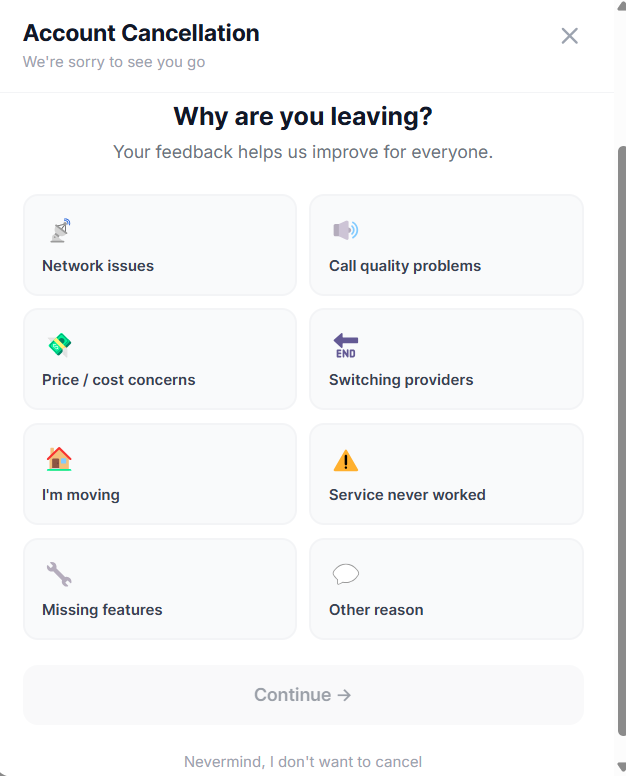
Step 3: Tell Us What You Valued
Next, you'll see the question: "What do you value most?"
Select the feature or benefit that meant the most to you during your time with Voiply. Your options are:
- 24/7 customer support
- Big savings on my bill
- Voiply Mobile App
- Crystal clear HD voice
- Free international calling
- Keeping my number
Click Continue when you're done. 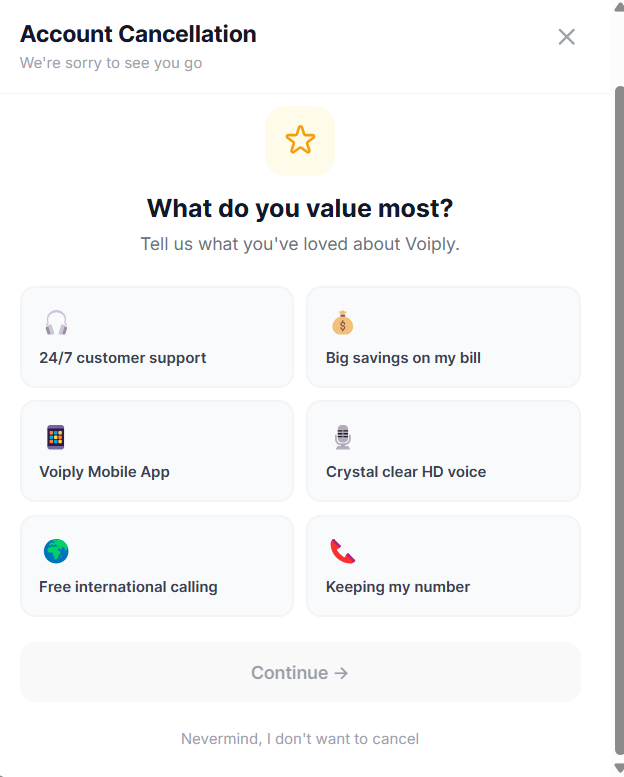
Step 4: Review Your Retention Offer (Optional)
Before your cancellation is processed, we may offer you one of the following options to stay:
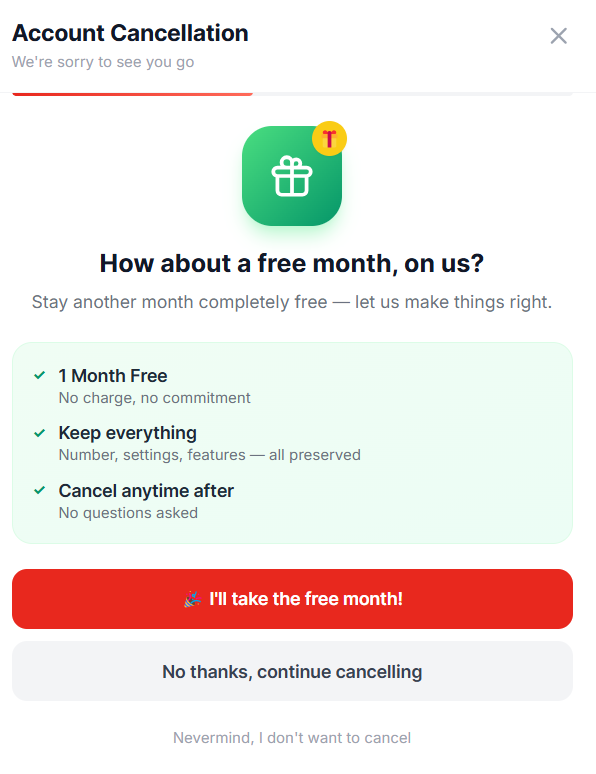
Free Month Offer We may offer you one month completely free — no charge, no commitment. Your number, settings, and features will all stay in place, and you can cancel anytime after with no questions asked.
- To accept, click I'll take the free month!
- To keep cancelling, click No thanks, continue cancelling
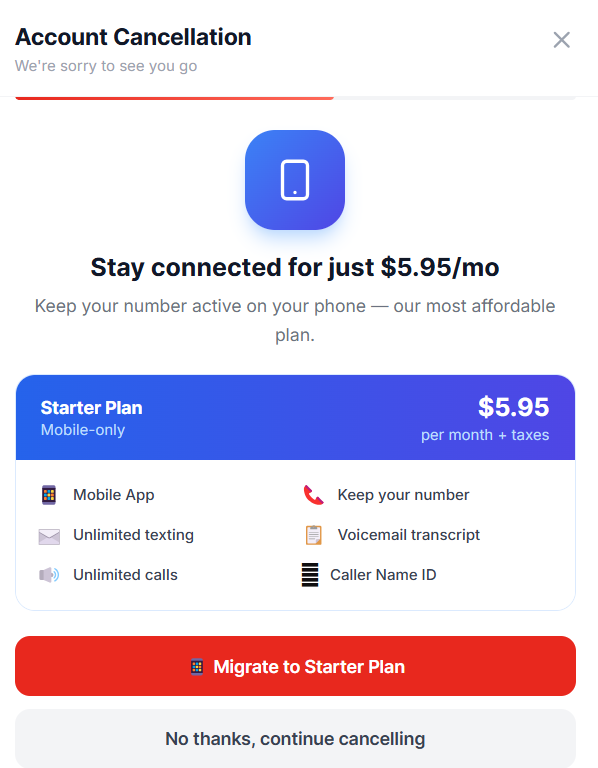
Starter Plan Offer We may also offer you the option to switch to our Starter Plan at just $5.95/month. This plan includes:
- Mobile App access
- Unlimited texting and calls
- Keep your number
- Voicemail transcript
- Caller Name ID
- To accept, click Migrate to Starter Plan
- To keep cancelling, click No thanks, continue cancelling
Note: You may see one or both of these offers depending on your account type and situation. You are never required to accept them.
Step 5: Number Parking Option (Optional)
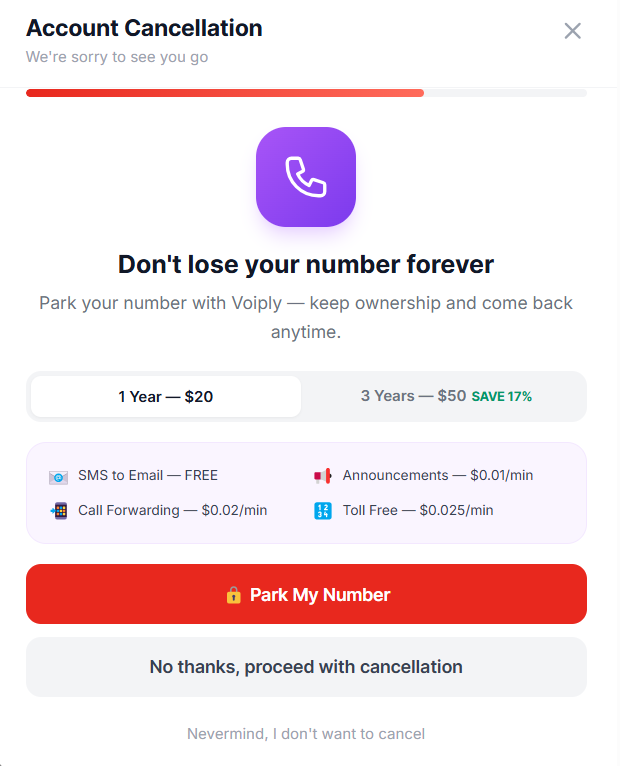
At Step 5 of 7, you'll have the option to park your phone number with Voiply. This lets you keep ownership of your number and come back anytime.
Parking options are:
- 1 Year — $20
- 3 Years — $50 (save 17%)
Parked numbers also include:
- SMS to Email — FREE
- Call Forwarding — $0.02/min
- Announcements — $0.01/min
- Toll Free — $0.025/min
- To park your number, click Park My Number
- To continue without parking, click No thanks, proceed with cancellation
Step 6: Device Return
At the final step (Step 7 of 7), you'll be asked: "Do you have a Voiply device?"
If you do not have a device: Select No device to return — I only used the mobile app and your cancellation request will be submitted. 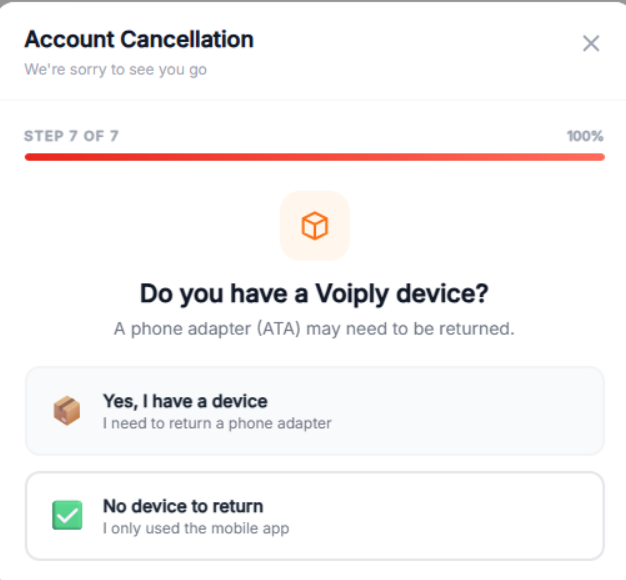
If you have a device (ATA/phone adapter): Select Yes, I have a device — I need to return a phone adapter.
You'll then see return instructions:
- Securely pack the device in a box
- Ship it to the address below
- Get a receipt from your carrier
Return Address: VOIPly LLC 2200 Wheless Lane Austin, TX 78723
Important: Returning your device helps you avoid a $30 unreturned device fee.
You can purchase a prepaid return label through the portal for $5.99 via EasyPost. Please note that return labels are non-refundable once purchased.
If you've already shipped your device, enter your tracking number in the field provided and click Submit.
If you'd prefer to arrange the return on your own, click Skip — I'll arrange the return separately. 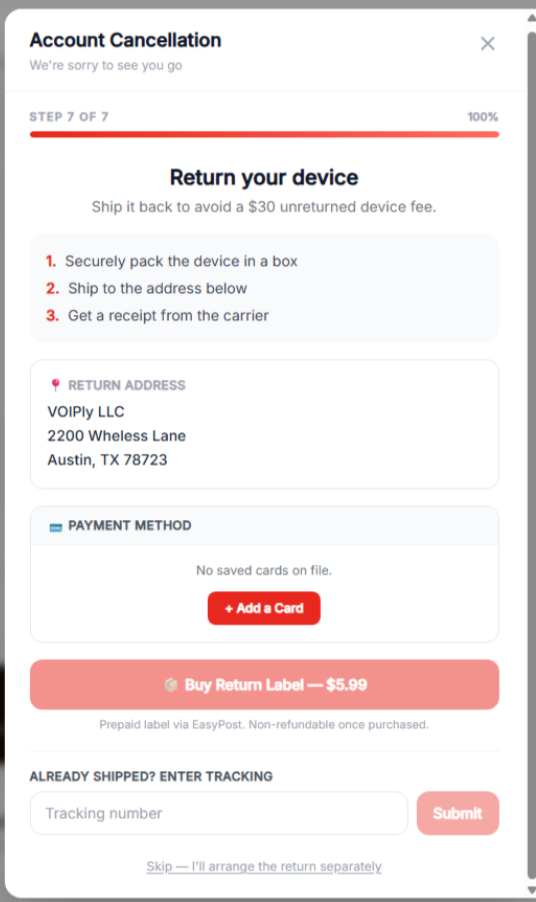
What Happens Next
Once your cancellation request is submitted:
- Your account will be closed within 24 hours
- You'll receive a confirmation email once the cancellation is complete
If you don't receive a confirmation email within 24 hours, please reach out to our support team at [support link or contact info].
Changed Your Mind?
If you decide you don't want to cancel, you can click Nevermind, I don't want to cancel at any point during the form. You can also close the form window at any time.
We'd love to have you back if you ever change your mind. Visit [voiply.com] to explore our plans.