
Key Details
- Who can use it: Any Voiply residential customer
- Cost: Included with your Voiply service at no extra charge
- Where to find it: In your Voiply portal under Call Forwarding settings
- Works with: Call Forwarding (both features are managed in the same place)
How to Turn On Call Screening
Follow these steps to enable Call Screening in your Voiply portal:
Step 1: Log in to your Voiply portal Go to your Voiply account and log in with your username and password.
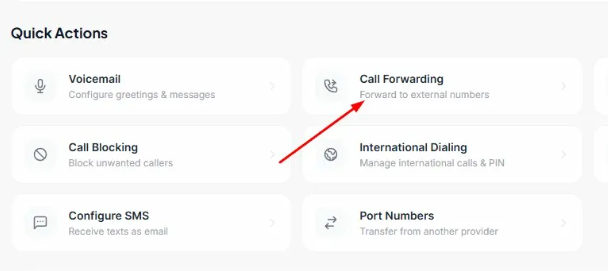
Step 2: Go to Call Forwarding From the dashboard, find the Quick Actions section. Click on Call Forwarding.
Step 3: Open Call Forwarding settings A window called Manage Call Forwarding will pop up. You will see two options:
- Enable Call Forwarding
- Call Screening
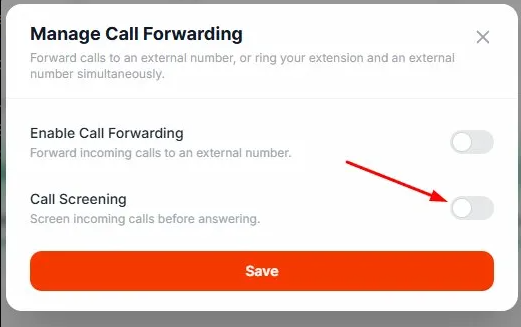
Step 4: Turn on Call Screening Click the toggle next to Call Screening to turn it on. The toggle will turn orange when it is active.
Step 5: Save your changes Click the Save button to apply your settings. 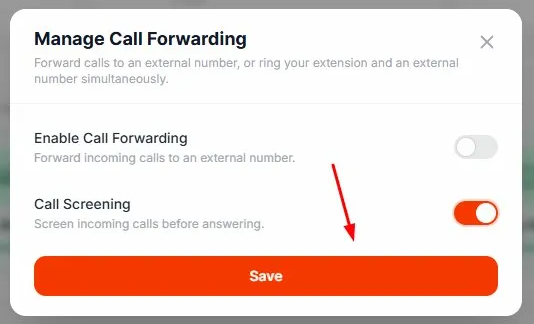
What Happens When Call Screening Is On
Once Call Screening is turned on, here is what your callers will experience:
- When someone calls you, they will be prompted to say their name.
- You will hear their name before the call connects.
- You will have three options for how to handle the call:
- Press 1 to answer the call
- Press 6 to send the caller to voicemail
- Press 7 to hang up
This is especially helpful if you get a lot of spam or robocalls, since most automated callers will not be able to complete the screening prompt.
Summary
Call Screening is a simple, free tool that helps you stay in control of who gets through to you. You can turn it on or off at any time right from your Voiply portal. If spam calls are a problem for you, enabling Call Screening is one of the easiest ways to cut them down.
If you need help, reach out to our support team at any time.