---
title: Premier and Advanced - How users can set up the Voiply Mobile App
description: Learn how to install and log in to the Voiply Mobile App for Premier customers on Android or iOS using a magic link sign-in sent straight to your email.
---
[Skip to content](https://kb.voiply.com/setting-up-the-voiply-mobile-app-0-0#main-content)
English
Show submenu for translations

Open main navigation
Close main navigation
- English
Show submenu for translations
- Contact us
Contact us
How can we help you?
- There are no suggestions because the search field is empty.
1. [Voiply Knowlege Base](https://kb.voiply.com/)
2. [Business Phone Service](https://kb.voiply.com/business-phone-service)
3. [Premier Plan](https://kb.voiply.com/business-phone-service#premier-plan)
# Premier and Advanced - How users can set up the Voiply Mobile App
## This guide will walk you through how to install and log in to the Voiply Mobile App on your Android or iOS device.
### Step 1: Install the Voiply Mobile App
Before logging in, you'll need to install the Voiply Mobile App on your device:
- **Android:** [Download on Google Play](https://play.google.com/store/apps/details?id=com.voiply.online.android&hl=en_US&pli=1)
- **iOS (Apple):** [Download on the App Store](https://apps.apple.com/us/app/voiply-mobile-app/id1555541262)
You can also download directly from your [Voiply Premier Portal](https://www.voiply.com/portal/login). Log in and navigate to the **Voiply Mobile App** section, then tap the App Store or Google Play tile.
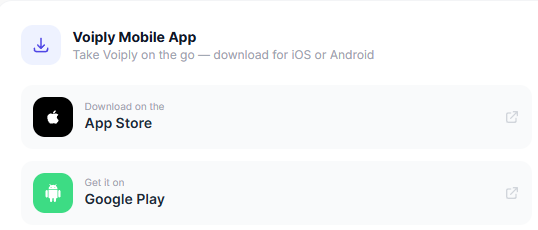
Once installed, proceed to the next step.
---
### Step 2:
Watch this quick video to see how it's done, or follow the steps below.
**Step 2: Log In with a Magic Link**
Logging in is quick and easy. We'll send a sign-in link right to your email.
1. Open the Voiply Mobile App on your iPhone.
2. On the **Get Voiply on Mobile** screen, enter your **Voiply phone number** and tap **Continue**. 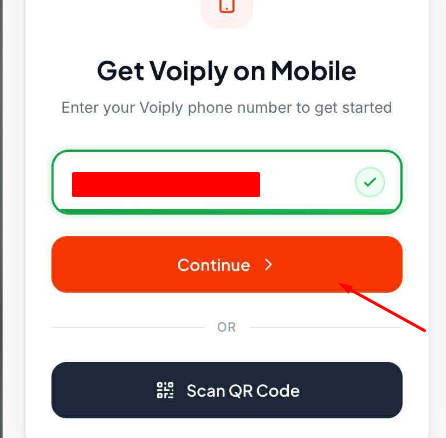
3. A sign-in link will be sent to the email address on your Voiply account.
**Note:** If your business uses one phone number for multiple users, you will be asked to enter your email address after you tap Continue. The sign-in link will be sent to the email you enter.
4. Open that email and tap **Sign in link**. You can also copy and paste the link into your browser.
- The link expires in **1 hour** and can only be used once.
5. The app will verify your identity. Once confirmed, you will see a **"You're all set!"** screen. 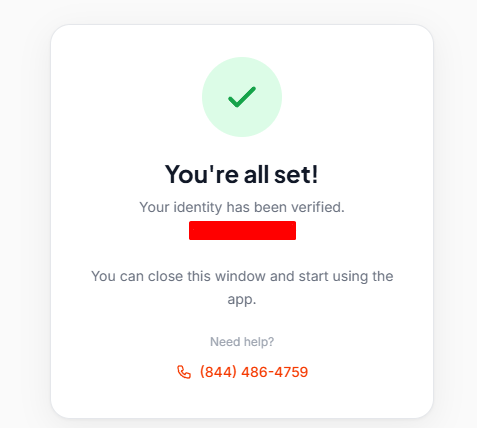
6. Close the browser window and return to the app. You are now logged in and ready to go!
---
**Need help?** Visit our [Support Center](https://kb.voiply.com/) or call us at **(844) 843-4175**.
- [Getting Started](https://kb.voiply.com/getting-started#main-content)
- [Account Setup & Verification](https://kb.voiply.com/getting-started#account-setup-verification)
- [Billing Basics](https://kb.voiply.com/getting-started#billing-basics)
- [Calling and Service Limitations](https://kb.voiply.com/getting-started#calling-and-service-limitations)
- [Features & Enhancements](https://kb.voiply.com/getting-started#features-enhancements)
- [Network Setup](https://kb.voiply.com/getting-started#network-setup)
- [Using the Voiply Mobile App](https://kb.voiply.com/getting-started#using-the-voiply-mobile-app)
- [Porting Your Number](https://kb.voiply.com/porting-your-number)
- [Home Phone Service](https://kb.voiply.com/home-phone-service#main-content)
- [Cancellation and Returns](https://kb.voiply.com/home-phone-service#cancellation-and-returns)
- [Troubleshooting](https://kb.voiply.com/home-phone-service#troubleshooting)
- [Billing and Payments](https://kb.voiply.com/home-phone-service#billing-and-payments)
- [Account Management](https://kb.voiply.com/home-phone-service#account-management)
- [Getting Started](https://kb.voiply.com/home-phone-service#getting-started)
- [Kids Phone Service](https://kb.voiply.com/kids-phone-service)
- [Business Phone Service](https://kb.voiply.com/business-phone-service#main-content)
- [Starter Plan](https://kb.voiply.com/business-phone-service#starter-plan)
- [The Essentials](https://kb.voiply.com/business-phone-service#the-essentials)
- [Premier Plan](https://kb.voiply.com/business-phone-service#premier-plan)
- [Number Parking](https://kb.voiply.com/number-parking)
- [Internet Service](https://kb.voiply.com/internet-service)
- [Online Fax Service](https://kb.voiply.com/online-fax-service)
- [Premium Add-ons](https://kb.voiply.com/premium-add-ons)
- [AI Receptionist](https://kb.voiply.com/ai-receptionist)
- [AI Assistant](https://kb.voiply.com/ai-assistant)
[](http://www.voiply.com)
301 Grant St #270, Pittsburgh, PA 15219
[mailto:support@voiply.com](mailto:support@voiply.com)
Copyright © 2025, Voiply, LLC
```json
{
"@context" : "https://schema.org",
"@type" : "VideoObject",
"contentUrl" : "https://45056553.fs1.hubspotusercontent-na1.net/hubfs/45056553/video_assets/212470589369/inherited/web_optimized.mp4",
"dateModified" : "2026-05-07T21:53:05.330Z",
"duration" : "PT27.961S",
"height" : 1624,
"name" : "voiply_mobile_app_setup (1)",
"thumbnailUrl" : "https://45056553.fs1.hubspotusercontent-na1.net/hubfs/45056553/voiply_mobile_app_setup%20(1).mp4/medium.jpg",
"uploadDate" : "2026-05-07T21:48:03.454Z",
"width" : 720
}
```