
Key Details
- Automatic location sharing when you dial 911.
- E911 is available in all supported areas.
- Power or internet outages may impact your ability to call 911.
- Always keep your E911 address current to ensure accurate routing.
How to Update Your E911 Address in the Voiply Portal
Updating your E911 address only takes a moment. Follow the steps below.
1. Log in to Your Voiply Portal
Go to https://www.voiply.com/ and sign in to your account.
2. Select "Configure E911"
On your dashboard under Quick Actions, locate the Configure E911 tile and click it. 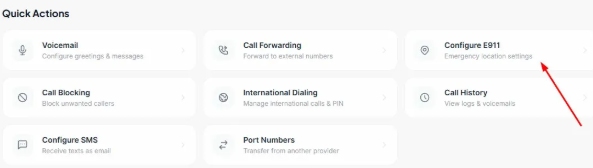
3. Enable E911 (if not already active)
In the Registered E911 Location window, confirm that the E911 Active toggle is turned on. This enables emergency location services for your number.
4. Enter or Update Your E911 Address
Fill in the following fields:
- Full Name
- Street Address
- Apt / Suite (if applicable)
- City
- State / Province
- Zip
- Country
Make sure the address is accurate and complete — this is what emergency responders will receive when you call 911.
5. Save Your Changes
Click Update E911 to save your information. 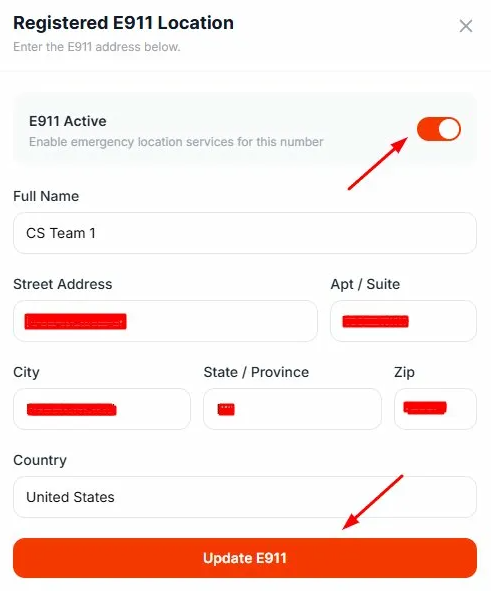
Why Keeping Your E911 Address Updated Matters
If you move or change where you use your Voiply service, updating your address ensures emergency responders can reach you quickly.
Need help or have questions? Voiply Support is always here to assist.